PC

Cara mematikan lampu ransel di Arc Raiders

๐Ÿ“ฐ PC Gamerโœ๏ธ Sean Martin๐Ÿ“… 2 jam lalu๐Ÿ‘ 5 views

๐ŸŒ Konten masih dalam Bahasa Inggris. Terjemahan sedang diproses.

Cara mematikan lampu ransel di Arc Raiders

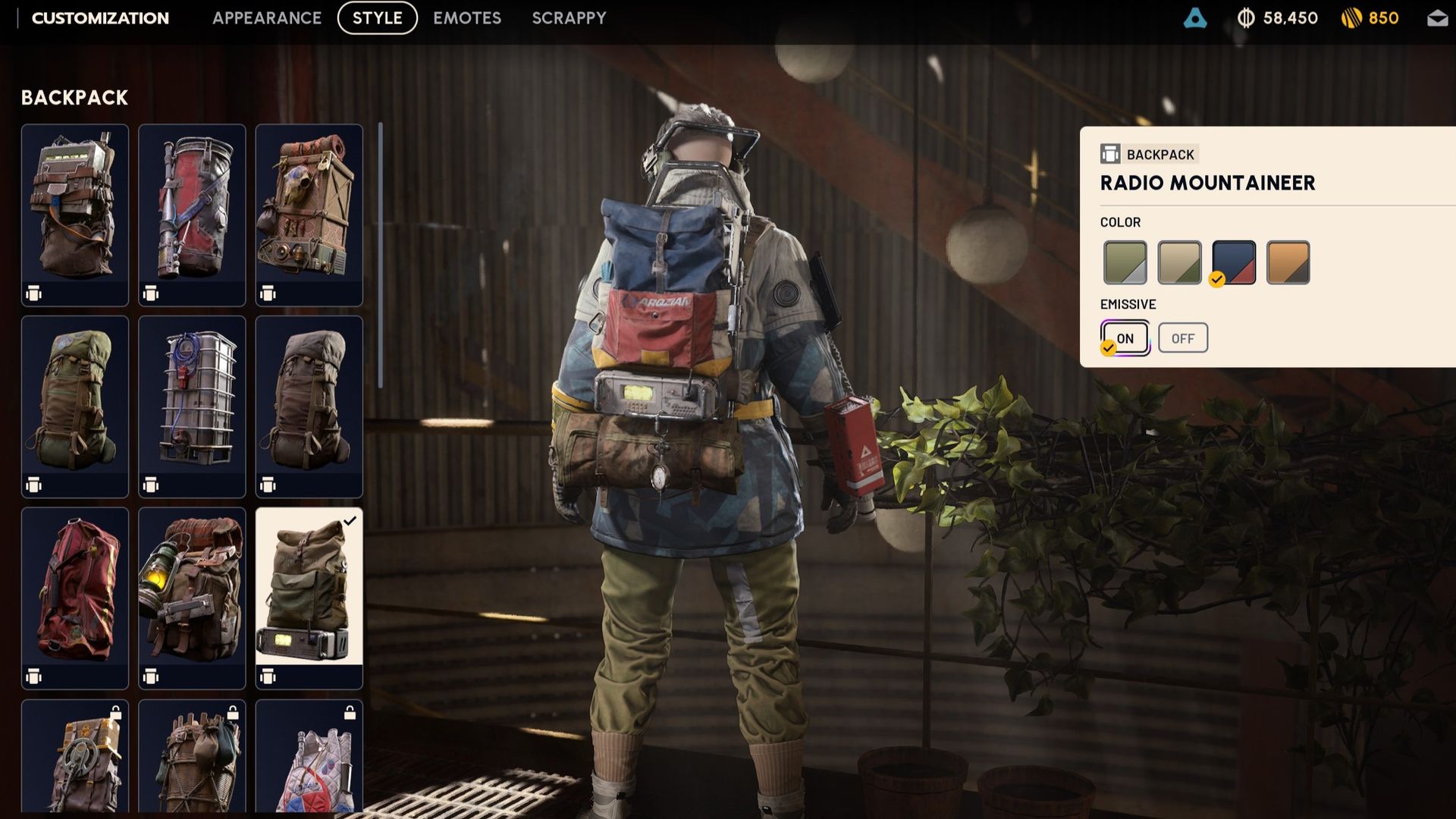
You're looking for the "Emissive" option (Image credit: Embark Studios)
Key deets

๐Ÿ’ก Arc Raiders now has an option to turn off the light on your backpack.

๐Ÿ’ก This is the "Emissive" toggle in each backpack's cosmetic menu.

Arc Raiders has made lots of new tweaks and additions with Frozen Trail's 2.0 update, but one long-requested change of significant note is that you can turn off the light on your backpacks.

To do this, you need to:

  1. Select the "Raider" menu.
  2. Enter "Customization" on the bottom left of the screen.
  3. Go to the "Style" menu at the top.
  4. Choose "Backpack" on the left side.
  5. Toggle the Emissive option to "off".

As you'll see, while looking at the backpack, the light will disappear and reappear as you toggle this, though where exactly the light is varies from pack to pack. This should help you be a little sneakier, though it might make your character a bit harder to spot in some of the game's darkest areas.

2026 games: All the upcoming games
Best PC games: Our all-time favorites
Free PC games: Freebie fest
Best FPS games: Finest gunplay
Best RPGs: Grand adventures
Best co-op games: Better together

Sumber: PC Gamer

Kenapa Memilih Kami?

โšก

Proses Instan

24/7 otomatis

๐Ÿ’ฐ

Harga Termurah

Harga bersaing

๐Ÿ”’

100% Aman

Refund jika gagal

๐Ÿ“ƒ

Terlengkap

Beragam produk

๐ŸŽ

Cashback

Setiap pembelian

๐Ÿ’ณ

Multi Payment

Banyak metode

๐Ÿ’ฌ

CS 24/7

Bantuan kapan saja

๐Ÿ“ฌ Newsletter

Dapatkan info promo, produk baru, dan berita terkini langsung ke email kamu.

Kami tidak akan mengirim spam. Kamu bisa berhenti berlangganan kapan saja.

FAQ - Pertanyaan Umum

Temukan jawaban untuk pertanyaan seputar layanan kami

MakerGames adalah platform terpercaya untuk pembelian voucher game, top-up game, pulsa, paket data, token PLN, dan berbagai produk digital (PPOB) lainnya dengan harga termurah dan proses instan.
Pilih produk yang diinginkan, masukkan data yang diperlukan (seperti User ID atau nomor HP), pilih nominal, lakukan pembayaran melalui metode yang tersedia, dan produk akan dikirim secara otomatis dalam hitungan detik.
Kami mendukung berbagai metode pembayaran termasuk transfer bank, QRIS (GoPay, OVO, DANA, ShopeePay, Bank dan lain-lainnya), virtual account, dan saldo deposit.